
How to Do a Business Entity Search in Vermont
If you're starting a business in Vermont, conducting a business entity search is your first step. Here's a quick and easy-to-follow guide made just for you.
Why Run a Business Search in Vermont
Business searches help in a few key ways:
- Entrepreneurs can check if a business name is available before filing paperwork.
- Investors verify that a company exists and is in good standing before investing.
- Attorneys confirm registration details during due diligence.
- Vendors and contractors review client status before extending credit or signing contracts.
The search tool shows details like:
- Formation dates
- Registered office addresses
- Current status
- Filing history
These details support smart decisions about transactions and partnerships. For example, a business that's been administratively dissolved might not be able to enter into contracts like an active company can.
Accessing the Vermont Business Entity Search Tool
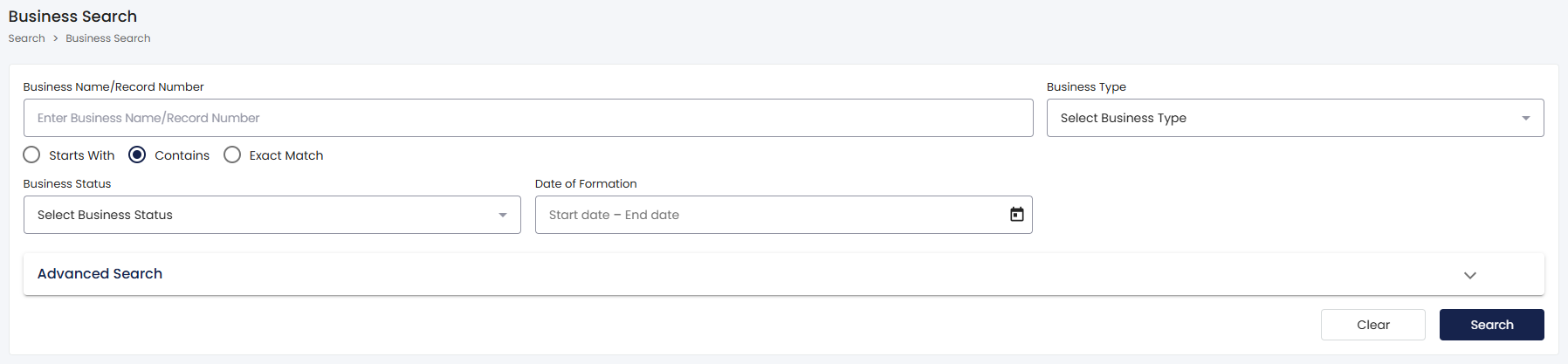
The Vermont Secretary of State offers a free online business entity search at https://bizfilings.vermont.gov/online/BusinessInquire/BusinessSearch. There's no need to register or log in. Visit the site and start your search. You can use it as often as you like, at no cost.
How to Perform a Basic Search
When you open the search page, you'll see:
- A text box to enter a business name or record number.
- Radio buttons to choose how the system matches your input.
Search Logic Options
| Option | Function | Best Use Case |
|---|---|---|
| Starts With | Matches names beginning with your input | When you know the first word of the business name |
| Contains | Finds names where your input appears anywhere | When you know part of the name but not the beginning |
| Exact Match | Returns only entities with precise name matches | When you have the complete, accurate business name |
For example:
- Choose "Starts With" and search for "Green Mountain" to see businesses beginning with those words.
- Pick "Contains" to find any business name that includes "Green Mountain," such as "The Green Mountain Company" or "North Green Mountain Holdings."
Advanced Search Features
You can filter your search results using dropdown menus:
- Narrow by entity type, such as limited liability companies, corporations, or nonprofits.
- Limit the results to specific status designations.
Filtering is useful when a common word appears in many business names. For example, searching for "Vermont" alone might return thousands of results, but adding filters for type and status makes results easier to manage.
Reading Your Search Results
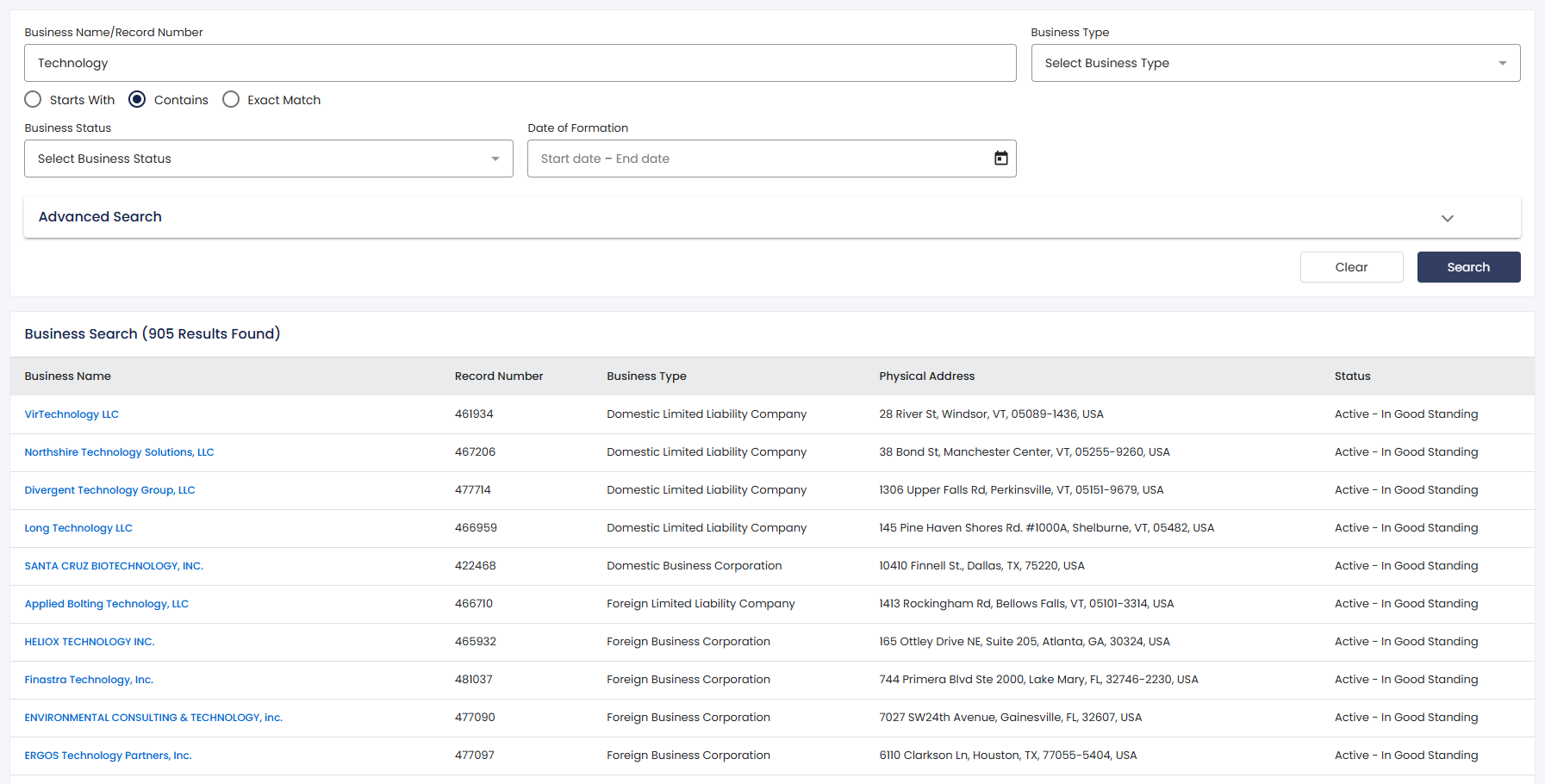
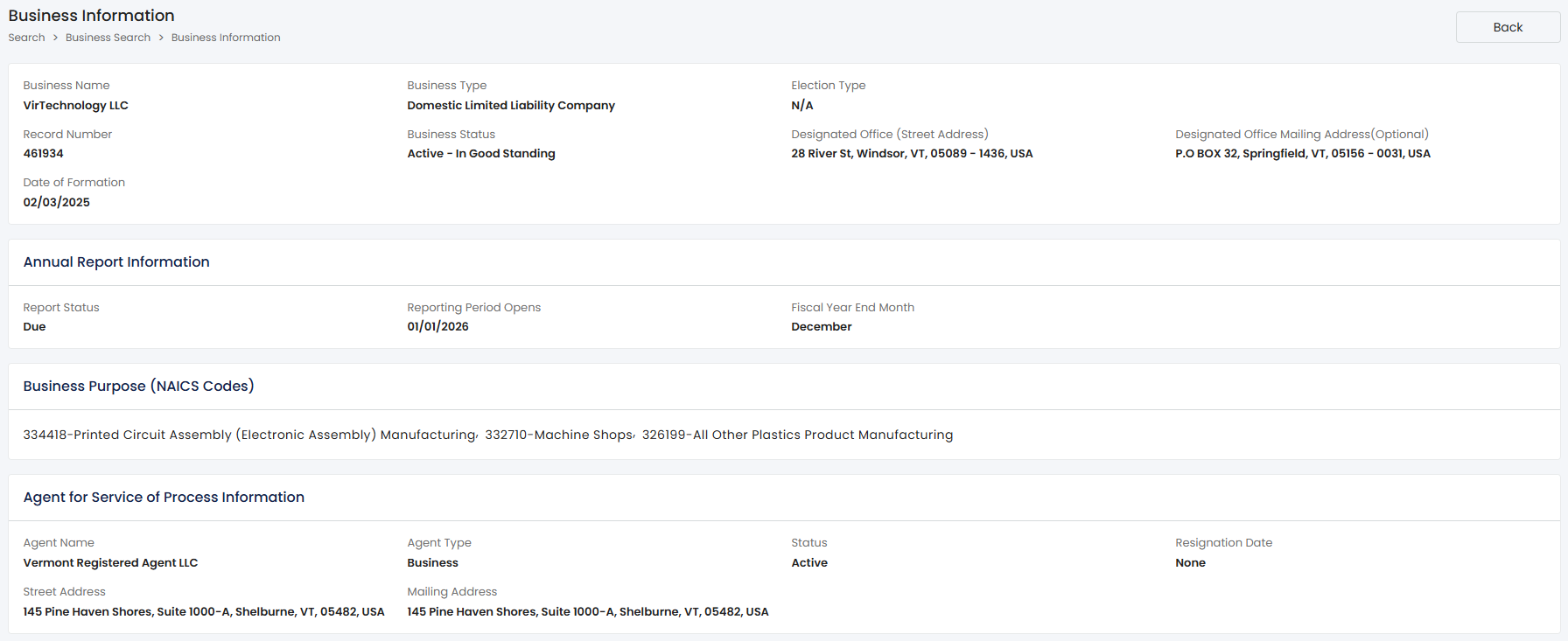
When you click on a business name in the results, you'll see a page with all the details the Vermont Secretary of State has for that company.
Key Information Fields
The detail page shows the formation date, which reflects when the Secretary of State processed and approved the original filing. Note that business owners can specify a future effective date up to 90 days after approval, so the formation date and the effective date may differ.
The registered office address appears on the page. This is the official address where the business can receive legal documents and correspondence from state agencies. The page also displays the registered agent's name and address, who accepts service of process on the entity's behalf.
Filing history appears at the bottom of the detail page. This section lists every document the business has submitted to the Secretary of State, including annual reports, amendments, and any name changes.
Understanding Status Designations
You can check a business's current status. The most common status types are:
| Status | Meaning | Implications |
|---|---|---|
| Active | The entity maintains good standing with required filings and fees current | The business operates legally and can enter into contracts |
| Admin Dissolved | The state dissolved the entity administratively | Typically results from missed annual reports or unpaid fees |
| Dissolved | The business formally dissolved or withdrew registration | The entity no longer exists as a legal structure in Vermont |
- Active: The business has met all applicable state requirements and is legally authorized to operate.
- Admin Dissolved: The state removed the business from good standing due to missed deadlines or unpaid fees. The company may face limitations on its actions until those issues are resolved.
- Dissolved: The business is no longer operating, either because the owners dissolved it or the state dissolved it. You can't do business with a dissolved company.
Using Search Results for Name Availability
Before you set up a new business, Vermont requires that your chosen name not be too similar to existing companies. Running a search helps you find out whether your preferred name is available.
You can reserve a business name for $20. This reserves your name for 120 days while you prepare your documents, preventing others from registering it during that period.
Registration Fees and Requirements
If your search shows the name is available and you want to form a limited liability company, the filing fee is $155. If you're using a different name than your legal one, you'll need to file an Assumed Business Name Registration for $70.
Vermont requires specific words in business names:
- Limited liability companies must include "limited liability company," "limited company," or abbreviations like "LLC," "Ltd. Liability Co.," "LC," or "Ltd. Co."
- Low-Profit limited liability companies use "L3C."
- Blockchain-based LLCs can use any of these options.
Submitting Filings After Your Search
Most filings happen online at bizfilings.vermont.gov. If you need paper forms, you can request them from the office since they aren't posted online.
If you have questions, reach out to the Corporations Division at sos.corporationssupport@vermont.gov, visit 128 State Street in Montpelier, or call (802) 828-2386.
Practical Applications of Business Search Data
When you're thinking about a merger, acquisition, or investment, checking the database confirms whether a company is in good standing. You can verify a company's status quickly before making any decisions.
Lenders and creditors check the database to track the status of businesses that owe money. If a company is dissolved, it can affect how it handles collections.
Market analysts and researchers sometimes use these filings to identify when new businesses enter specific categories.
Getting the Information You Need
The Vermont Secretary of State business search gives you free access to public business records. Understanding how the search options and status types work can help you make informed decisions.
Frequently Asked Questions
Is there a fee to use the Vermont business entity search?
No, the tool is free, and you don't need an account. You can run as many searches as you want, at no cost.
What information does the search provide about a business?
The results page shows the formation date, registered office address, registered agent details, current status, and the business's entire filing history.
How much does it cost to register a limited liability company in Vermont?
The fee to form a limited liability company is $155. Name reservation is $20, and registering an assumed business name costs $70.
What does "Admin Dissolved" mean in search results?
"Admin Dissolved" means the state removed the business from good standing, usually because it missed filing reports or paying fees.
Can I reserve a business name before filing formation documents?
Yes, you can reserve a name for $20, which holds it for 120 days so you have time to get your paperwork ready.
Where can I contact the Vermont Secretary of State with questions?
You can email sos.corporationssupport@vermont.gov, call (802) 828-2386, or stop by 128 State Street in Montpelier for help.