
How to Conduct a South Dakota Entity & Business Search
Do you need to check if your business name is available in South Dakota? Here's a quick and simple guide to conduct a South Dakota Entity and Business Search
Why Run a Business Search in South Dakota
People have several reasons for searching business records:
- To check if the company they're considering actually exists.
- To see if a business name is available before starting paperwork.
- To verify a company's status before making investments or loans.
- To review records for legal due diligence.
The South Dakota Secretary of State's portal provides:
- Registration dates
- Status of the business
- Registered agent information
- Filed documents
This search can help you begin research or confirm what you know about a business.
Getting Started
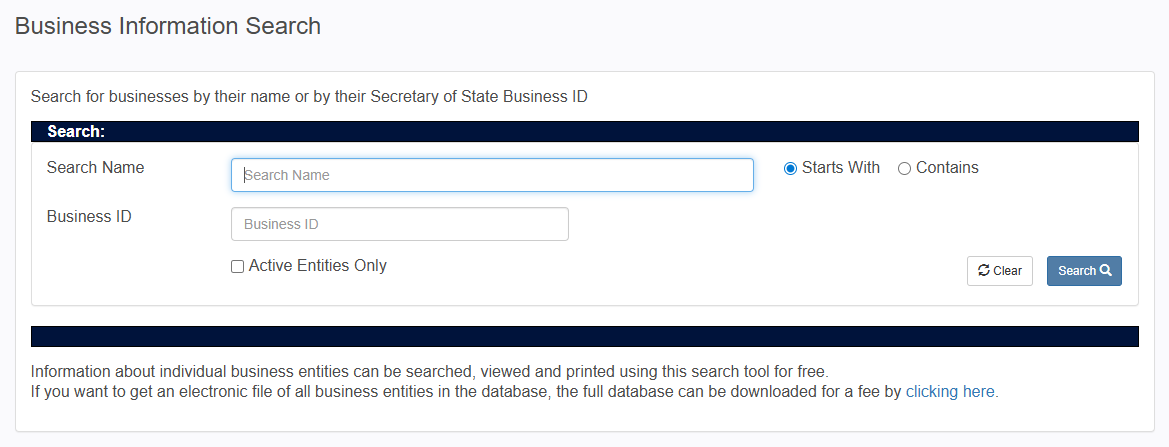
You'll find the search portal at sosenterprise.sd.gov. No login or payment is needed for basic searches. The homepage includes a link to the business entity search in the public records section.
The search portal works well on computers and mobile devices. When you reach the search page, you'll see fields to enter your search terms and options to filter your results.
| Feature | Details |
|---|---|
| Cost | Free for basic searches |
| Account Required | No |
| Available Records | Businesses from 1994 to present (most images) |
| Pre-1994 Documents | Available upon request for $2 per page |
| Full Database Download | Available for a fee |
Search Methods Available
You can search for business information in three ways, depending on what you already know.
Business Name Search
Business name search is the most common method. Enter the company name you want to find. The system gives you two options:
- Starts With: Returns results whose names begin with your search term
- Contains: Finds any business name that includes your search term anywhere in its name
If you know how a business name begins, use Starts With. For a broader search, or if you only remember part of the name, try the Contains operator. This way, you catch any business with your search term in any part of its name.
For example, searching for "Dakota" with the Contains option returns businesses whose names contain "Dakota." This helps if you're not sure of the exact name on file.
Business ID Search
Each business registered with the Secretary of State has a unique identification number. If you have this number, maybe from earlier paperwork or a contract, enter it to go directly to the business record you want.
Registered Agent Search
A registered agent search lets you find all businesses associated with a specific agent. Registered agents receive official legal and tax documents for a company. In South Dakota, the agent must have a street address in the state.
This search is handy if you want to see all businesses associated with a particular person or agency. It sometimes reveals patterns of ownership or management.
Filtering Your Results
You'll see a checkbox to filter for active businesses. If you check it, you'll get results for companies in good standing. Leave it unchecked to see all matching businesses, including dissolved or inactive ones.
If you're checking whether a name is available, it's helpful to see all results. Dissolved companies may adopt new names later, and new names must be distinct from any on record. Reviewing every result helps you plan your next steps.
Reading Search Results
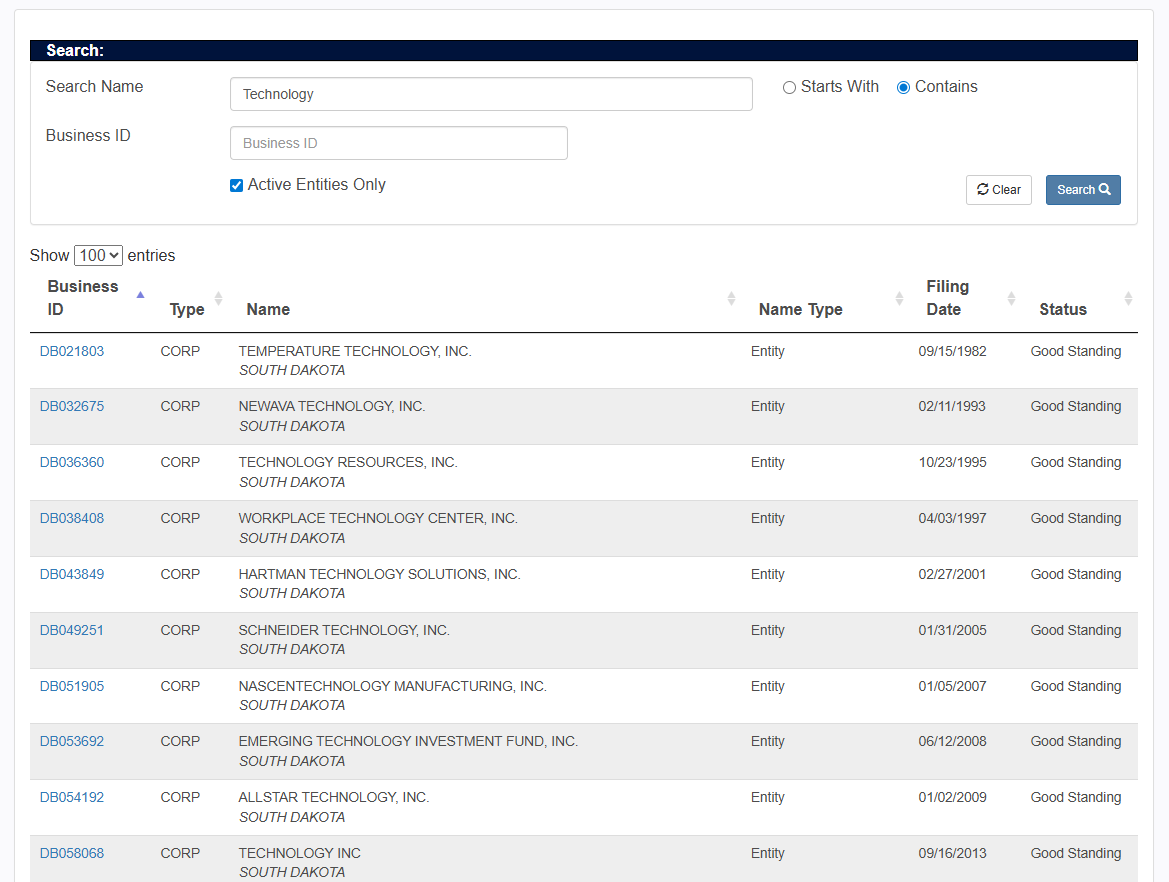
After you run a search, matching businesses appear in a table. Each row is a separate business, and columns show the identification number, name, status, and other details.
Understanding Entity Status Labels
The status column shows each business's standing with the state. Here's what each label means:
| Status | Meaning |
|---|---|
| Active | The business is in good standing, with all filings current. |
| Inactive | Business is no longer operating or has been administratively dissolved. |
| Delinquent | Business has failed to file required reports or pay fees. |
| Admin Dissolved | The Secretary of State dissolved the business, typically for failing to file annual reports. |
| Revoked | The business's authority to operate has been revoked. |
An active status indicates the business has met its filing obligations and paid required fees. Delinquent status suggests that the company has fallen behind, even if it is still operating. Admin Dissolved and Revoked statuses indicate more serious compliance failures.
Viewing Detailed Business Information
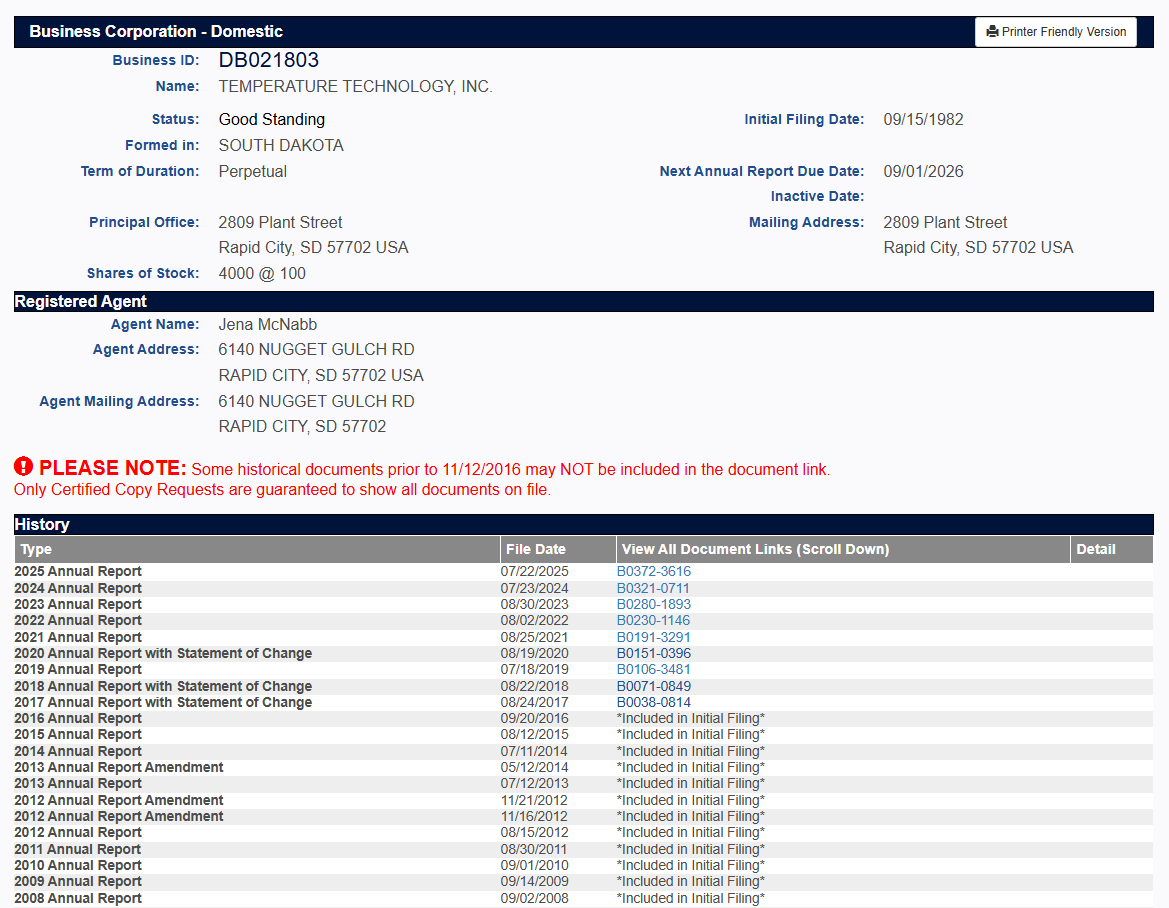
To see full details on a business, click its identification number in the first column of your search results. You'll go to a page with more information about that business.
The detail page shows:
- Basic registration information, like formation date, entity type, and current status.
- Parties associated with the business and their contact information, typically including the registered agent and, depending on the business type, officers or managers.
You'll also see documents filed with the Secretary of State:
- For businesses formed since 1994, most documents are online.
- You can view articles of organization, annual reports, amendments, and more by clicking the document links.
- For documents filed before 1994, request copies from the Business Filing Office for $2 per page.
Using the Search for Name Availability
State law says business names must be unique. If you want to register a new business, run a name check in the portal first to avoid having your application denied.
Search for your proposed name using the Contains option to catch close matches. Review both active and inactive businesses, as similar names, even among dissolved companies, can cause problems. The Secretary of State makes the final decision, but this search helps you spot possible conflicts early.
Filing Fees for New Businesses
If your search shows a name is available and you want to register, here are the current filing fees:
| Filing Type | Online Fee | Paper Fee |
|---|---|---|
| Articles of Organization | $150 | $165 |
| Annual Report | $55 | Higher |
| DBA Registration | $10 | $10 |
South Dakota increased the annual online report fee from $50 to $55, starting July 1, 2025. DBA registrations stay valid for five years before renewal.
Downloading the Full Database
If you need access to all registered businesses, South Dakota offers a downloadable database for a fee. Contact the Business Filing Office for up-to-date pricing and file format details.
Frequently Asked Questions
Is the South Dakota business search free?
Yes. You can search, view, and print business information on the sosenterprise.sd.gov portal at no cost. Downloading the entire database or requesting archived documents from before 1994 incurs an additional fee, but regular searches don't.
Do I need an account to search South Dakota business records?
No account or login is needed. You can use the portal and start your search right away.
What information can I find about a South Dakota business?
You'll see the business name, identification number, status, formation date, type, registered agent, and filed documents in your results. For most businesses formed since 1994, you can also view document images online.
How do I check if a business name is available in South Dakota?
Run a search using your proposed name with the Contains option. Review all results, including inactive businesses. State law requires names to be distinguishable from existing records. The search provides a preliminary check, though the Secretary of State makes the final determination during the filing process.
What does "Admin Dissolved" status mean?
Admin Dissolved indicates the Secretary of State has administratively dissolved the business. This typically happens when a business fails to file required annual reports. The company no longer has the authority to operate in South Dakota under that registration.
How much does it cost to file a new business in South Dakota?
Filing articles of organization costs $150 online or $165 by paper. Annual reports cost $55 when filed online, effective July 1, 2025. DBA filings cost $10 and must be renewed every five years.